7-Zip (file archiver with high compression ratio)
Monday, April 30, 2007
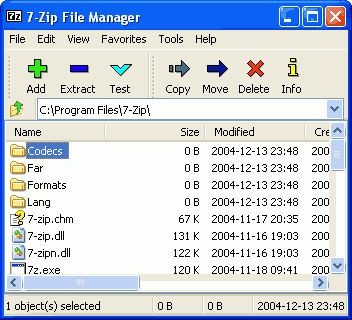
- High compression ratio in new 7z format with LZMA compression
- Supported formats:
- Packing / unpacking: 7z, ZIP, GZIP, BZIP2 and TAR
- Unpacking only: RAR, CAB, ISO, ARJ, LZH, CHM, Z, CPIO, RPM, DEB and NSIS
- For ZIP and GZIP formats 7-Zip provides compression ratio that is 2-10 % better than ratio provided by PKZip and WinZip
- Self-extracting capability for 7z format
- Integration with Windows Shell
- Powerful File Manager
- Powerful command line version
- Plugin for FAR Manager
- Localizations for 63 languages
Free PDF Creator - PrimoPDF

Convert to PDF from any application by simply 'printing' to the PrimoPDF® printer - it couldn't be easier! Within minutes, you can create and append high-quality PDFs by converting from Word, Excel, PowerPoint, and virtually any other printable file type.
- FREE PDF Converter - not a trial version.
- Print to PDF from virtually any application.
- Create PDF output optmized for print, screen, ebook, or prepress.
- No annoying pop-up ads, no registration requirement - no catch!
- High-quality, easy to use PDF creator for all users.
- NEW! Ability to merge and append PDF files upon conversion
Yod'm 3D (Yet anOther Desktop Manager 3D)
Friday, April 27, 2007

The free program lets you create four virtual desktops, which is nothing too special. You can do the same thing with Microsoft's Virtual Desktop Manager. But Yod'm 3D lets you switch between desktops by flipping through the sides of a 3D cube.
Website : Yad'm 3D (Download)
Free Download Manager
Thursday, April 26, 2007

Free Download Manager (FDM) is a full-featured download accelerator and manager. It is absolutely free! Using this software product you can easily download a list of files and whole web sites from any remote server via HTTP, HTTPS and FTP. With FDM the downloading process will be as easy as never before!
FDM is a light-weight, powerful and easy-to-use application. Also this software product is well-known for its intuitive and user-friendly interface. FDM can function as a site manager, accelerator, site explorer and scheduler.
FDM can resume broken downloads. So you needn't start the downloading process from the very beginning after casual interruption. You can resume unfinished download from the moment when it was interrupted. Also this program warns you if resuming isn't supported by the servers. It allows you to make a decision about the downloading. So with FDM you save your time and money.
FDM is an indispensable tool for download acceleration. It splits files into several sections and then downloads them simultaneously allowing you to increase your download speed up to 600%.
FDM is a light-weight, powerful and easy-to-use application. Also this software product is well-known for its intuitive and user-friendly interface. FDM can function as a site manager, accelerator, site explorer and scheduler.
FDM can resume broken downloads. So you needn't start the downloading process from the very beginning after casual interruption. You can resume unfinished download from the moment when it was interrupted. Also this program warns you if resuming isn't supported by the servers. It allows you to make a decision about the downloading. So with FDM you save your time and money.
FDM is an indispensable tool for download acceleration. It splits files into several sections and then downloads them simultaneously allowing you to increase your download speed up to 600%.
Website : http://freedownloadmanager.org (Download)
Launchy (Open Source keyboard launcher)
Wednesday, April 25, 2007
Launchy is a free windows utility designed to help you forget about your start menu, the icons on your desktop, and even your file manager.

Launchy indexes the programs in your start menu and can launch your documents, project files, folders, and bookmarks with just a few keystrokes!
The new release has added support for plug-ins, which bring lots of nifty new functions to Launchy. The most notable (pre-installed) plug-ins are:
- Web search: has searches for Google, Wikipedia, Amazon, and more built-in. To search Google, for example, hit Alt-Space to invoke Launchy, then start typing goo... until you have a match, hit Tab, then type your search terms.
- Firefox: indexes all your Firefox bookmarks, including keyword searches that work just like the default web searches above.
- Explorer navigation: Type c:, hit Tab, and you'll see the folders below
C:\. You can continue to do this as you navigate through your file system. You can even use shortcuts likemy doc...+ Tab to jump right into your My Documents folder. - Calculator: Simple math can be performed right inside Launchy. Just type it in and instantly see the results.
Subscribe to:
Posts (Atom)
