FileHamster - real-time backup and archiving files
Tuesday, May 15, 2007

FileHamster provides real-time backup and archiving of your files while you work. It enables you to monitor specific files on your hard drive and automatically create incremental backups whenever those files are modified. It also enables you to store notes about the changes that have been made, allowing you to quickly locate a specific revision or provide a detailed account of the work you've done on a project.
Features:
- first backup tool for artists: optimized to intelligently handle the varying saving schemes for all applications and includes features focused on helping artists be more efficient while they work.
- real-time backup: creates revisions as you save without affecting your workflow.
- plugin support: easily add new features through plugins. See our Downloads page to get them!
- simple: users of any skill level will be able to back up their files in seconds.
- easy interface: easiest backup tool on the market.
- comments: make notations as you go, enabling you to easily know what changes were made in each version.
Wink - Tutorial and Presentation creation software
Friday, May 11, 2007

This is a good example of how you can create tutorials in Wink, by capturing screenshots, mouse movements and specifying your own explanations with them. And all this in a standard Windows-based UI with drag-and-drop editing makes it very easy to create high quality tutorials/documentation.
It is estimated that Macromedia Flash Player is installed in more than 90% of the PCs. Using Wink you can create content viewable across the web in all these users' desktops. Similar applications sell for hundreds of dollars, while Wink is free with unrivaled features. So spread the word about Wink to your friends.
Features
- Freeware: Distributed as freeware for business or personal use.
- Cross-Platform: Available for all flavours of Windows and various versions of Linux (x86 only).
- Audio: Record voice as you create the tutorial for explaining better.
- Input formats: Capture screenshots from your PC, or use images in BMP/JPG/PNG/TIFF/GIF formats.
- Output formats: Macromedia Flash, Standalone EXE, PDF, PostScript, HTML or any of the above image formats. Use Flash/html for the web, EXE for distributing to PC users and PDF for printable manuals.
- Multilingual support: Works in English, French, German, Italian, Danish, Spanish, Serbian, Japanese, Brazilian Portuguese and Simplified/Traditional Chinese.
- Smart Capture Tools: Capture screenshots automatically as you use your PC, based on mouse and keyboard input (great time saver and generates professional captures).
- Performance/Quality: Creates highly compressed Flash presentations (few kbs to few hundreds of kbs, much smaller than competing commercial products) ideal for using on the web.
Free Antivirus Protection from COMODO
Tuesday, May 8, 2007

Automatically detects and eliminates Viruses, Worms and Trojan horses
Developed by one of the world’s leading IT security providers, Comodo AntiVirus leverages multiple technologies (including on demand & on access scanning, email scanning, process monitoring, worm blocking and host intrusion prevention) to immediately start cleaning or quarantining suspicious files from your hard drives, shared disks, emails, downloads and system memory.
Updated virus definitions are automatically downloaded according to a schedule of your choice or by a single click on the 'updater' button. Once installed, Comodo AntiVirus 2.0 beta will unobtrusively sit in your system tray, silently and efficiently defending your system from the latest virus outbreaks.
It's easy to install and configure, will not slow down your PC by hogging system resources and is free for life to the end user.
Download today and discover the benefits of a truly proactive virus defense
Website : http://www.antivirus.comodo.com/ (Download)Paint.NET (free image editing and photo manipulation)
Friday, May 4, 2007
Paint.NET is free image editing and photo manipulation software designed to be used on computers that run Windows. It supports layers, unlimited undo, special effects, and a wide variety of useful and powerful tools.
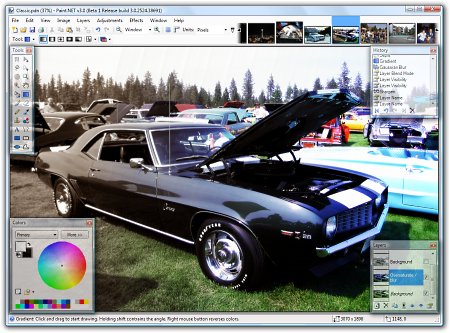
It started development as an undergraduate college senior design project mentored by Microsoft, and is currently being maintained by some of the alumni that originally worked on it. Originally intended as a free replacement for the MS Paint software that comes with Windows, it has grown into a powerful yet simple tool for photo and image editing.
The programming language used to create Paint.NET is C#, with a small amount of C++ for installation and shell-integration related functionality.
Website : http://www.getpaint.net (Downlaod)7-Zip (file archiver with high compression ratio)
Monday, April 30, 2007
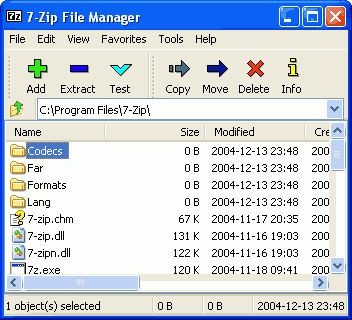
- High compression ratio in new 7z format with LZMA compression
- Supported formats:
- Packing / unpacking: 7z, ZIP, GZIP, BZIP2 and TAR
- Unpacking only: RAR, CAB, ISO, ARJ, LZH, CHM, Z, CPIO, RPM, DEB and NSIS
- For ZIP and GZIP formats 7-Zip provides compression ratio that is 2-10 % better than ratio provided by PKZip and WinZip
- Self-extracting capability for 7z format
- Integration with Windows Shell
- Powerful File Manager
- Powerful command line version
- Plugin for FAR Manager
- Localizations for 63 languages
Free PDF Creator - PrimoPDF

Convert to PDF from any application by simply 'printing' to the PrimoPDF® printer - it couldn't be easier! Within minutes, you can create and append high-quality PDFs by converting from Word, Excel, PowerPoint, and virtually any other printable file type.
- FREE PDF Converter - not a trial version.
- Print to PDF from virtually any application.
- Create PDF output optmized for print, screen, ebook, or prepress.
- No annoying pop-up ads, no registration requirement - no catch!
- High-quality, easy to use PDF creator for all users.
- NEW! Ability to merge and append PDF files upon conversion
Yod'm 3D (Yet anOther Desktop Manager 3D)
Friday, April 27, 2007

The free program lets you create four virtual desktops, which is nothing too special. You can do the same thing with Microsoft's Virtual Desktop Manager. But Yod'm 3D lets you switch between desktops by flipping through the sides of a 3D cube.
Website : Yad'm 3D (Download)
